Custom tag with colors =)
G2
📅 December 28, 2019#1
thx curry for the info
REMAKED BY rizzy
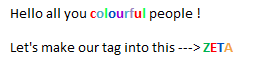
-
Downloads | Notepad++ (Download and Open)
-
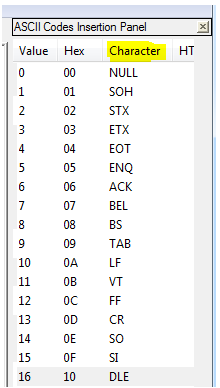
Go to Edit > Character Panel This should come up on the right hand side. Click on the Characters and not the other numbers. Just one thing, the first colour will actually be the corresponding number and the rest are Characters.
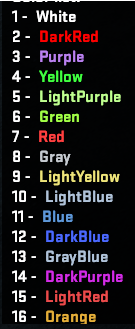
 Choose the colours from this list ----->
-
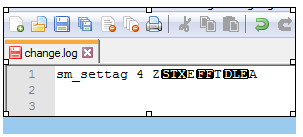
This is what it should look like. Copy paste it in console and press Enter.
MR
📅 December 28, 2019#2


LO
📅 December 28, 2019#3
here is a simple guide we made. we use the third person because we are royalty.
colourtags.rtf (1016.1 KB)
WO
📅 January 4, 2020#4
Is this for bullets when you shoot in ZE?

📅 January 4, 2020#5
no its for the thing in front of your Name in Chat
SH
📅 January 21, 2021#6
Thx a lot Rizzy for this ^^ and u too Zeta 
📋 This post is part of the historic Mapeadores forum. The content is preserved exactly as it was originally published.